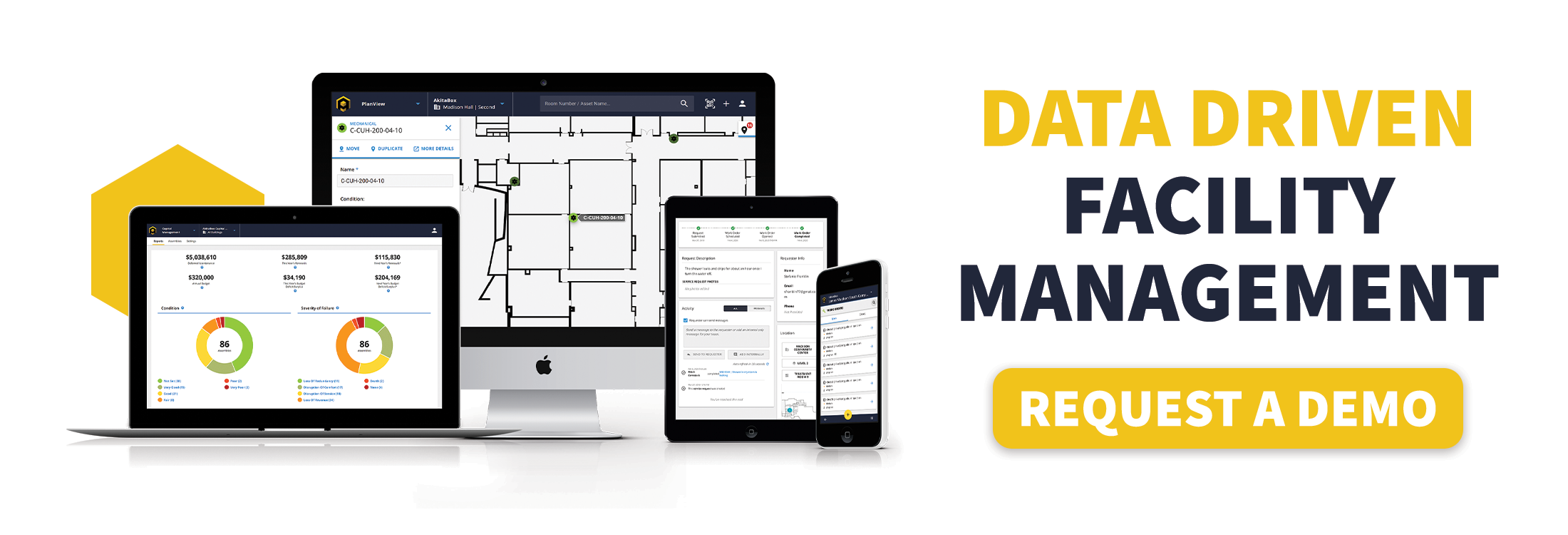

Importing & Building on 8 Years of Institutional Data
FM Case Study: Wheaton College
How a private college consolidated scattered facility data into a single system — and made it useful for everyone from the Chief Facilities Officer to summer interns.
Wheaton College Overview
Industry
Higher Education
Challenges
- Scattered information
- Need for a friendly interface that the team would utilize
Time Using AkitaBox
1.5 Years
The Mission
 Wheaton College is a private Christian liberal arts institution in Wheaton, Illinois, serving approximately 2,800 students across undergraduate and graduate programs. The Facilities team, led by Chief Facilities Officer Jay Bieszke, is responsible for roughly 70 buildings, 1.7 million square feet, and a staff of about 80 — half custodians, half skilled tradespeople — plus a small construction management group.
Ask Bieszke what drives the work, and the answer is one word: stewardship.
“Keeping the buildings well maintained and in a way that properly represents the college and the mission and supporting the students is an important part of what we do. Our resources are limited and we want every dollar spent to be meaningful.”
The Challenge
Like many institutions that have evolved over decades, Wheaton had accumulated facility information across multiple systems, spreadsheets, and shared drives. While the college’s legacy CMMS served important operational functions, it wasn’t designed to consolidate all of that information into a single, easily accessible repository. As a result, two challenges had become increasingly apparent:
Challenge 1: Information had no single home. Capital plans were built from numerous spreadsheets. Space management data lived in separate files outside the system. Studies, quotes, and asset history were stored in any one of many server folders. Bieszke describes consulting five different sources to pull together what he needed, with no obvious place to file information so the next person could find it either.
Challenge 2: The interface was a barrier. Most staff didn’t want to engage with the dense tables and lists of data. The team needed something graphical — floor plans, color-coded pins, visual dashboards — that matched how facilities staff normally think about buildings.

“User interface is important to what makes AkitaBox special for us and useful.”
Jay Bieszke • Chief Facilities Officer, Wheaton College
The Solution: A Practical FM Data Migration for Usability
Moving eight years of data from one system to another is the kind of project that can keep facilities teams struggling through a legacy system that isn’t working for them. Like many organizations with years of institutional knowledge, Wheaton had accumulated a significant amount of historical data. Preserving that information while making it more accessible was a key objective of the migration to AkitaBox.
Bieszke and AkitaBox Customer Success got to work, mapping fields, preserving relationships, and deciding what to pull across. There was back and forth: What can I do with this? Does this make sense? The team embedded legacy work order numbers in subject lines so they’d remain searchable, consolidated former employees under a single “Prior Contributor” user, and simplified multi-assignee data.
The goal was straightforward: make all of it accessible and queryable in a way that supports the work. The payoff was immediate — eight years of work order history, fully searchable and analyzable in AkitaBox, from day one.
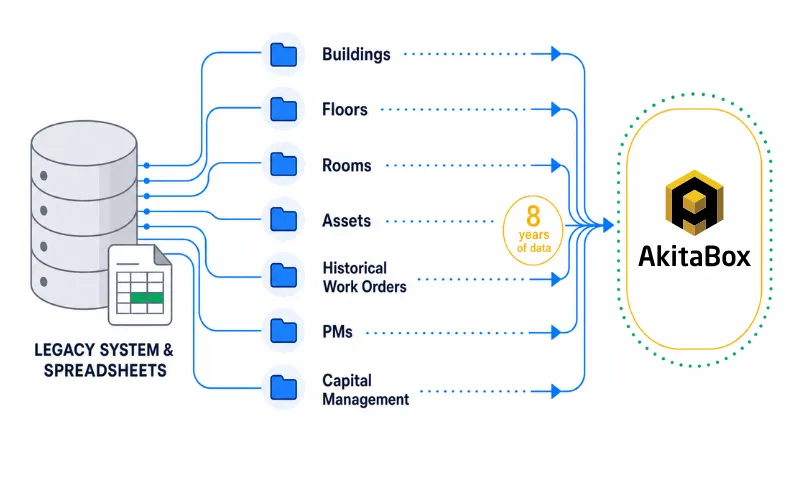
What about when a previously disconnected database doesn’t fit into a predefined set of fields in the new system?
The Wheaton team maintained a separate set of spreadsheets documenting numerous building deficiencies that were not integrated with their legacy CMMS. Working with AkitaBox, they found a home for the information by creatively loading the information as assets with a special type of deficiency, using the relationship function in the software to link to any relevant asset. This new connection allows Wheaton to review and prioritize work for each year’s capital renewal budget, with AkitaBox Insights providing the dashboard and outputs that facilitate discussions.
“We put our heads together and came up with a really elegant solution, and it seems to work quite well,” says Bieszke.
The Results: Legacy Data That Works in a New System
AkitaBox functions as if Wheaton has been on the platform for many years. Ad hoc analysis, year-over-year comparison, and operational pattern recognition, all powered by a visual interface that makes the data approachable instead of buried.
Historical work orders, for instance, provide technicians the ability to reference trends and notes from previous encounters of the same or similar issues. Painters can reference types and colors of coatings previously applied.
“The data is here, and it’s telling us the same story as though we’ve been using AkitaBox for several years.”
Jay Bieszke • Chief Facilities Officer, Wheaton College
Expanding Institutional Knowledge, Not Just Storing It
The imported data was step one. But AkitaBox is also changing where new information lives. Previously, a replacement quote or engineering study would get filed on a shared server somewhere, and could be difficult to locate months later.
Now the team files that information directly with the asset. Need the quote for the new dishwasher? Pull up the dishwasher in the map or list of the dish room — the quote, the replacement cost, and everything relevant is right there. No hunting through server folders, no asking three people where it was saved.
Team members are encouraged to write notes and use AkitaBox as the single repository for institutional knowledge. Not only is information better shared, it reduces the risk associated with the departure of employees. It’s a cultural shift as much as a technical one, and the staff has embraced it. Bieszke calls it “the one-stop shop” — and the more they put in, the more useful the system becomes for everyone who touches it.
Putting Data to Work: Real-Time Accountability
The real-time data payoff showed up clearly in the pilot program Wheaton created to track post-move-out residential inspections in AkitaBox.
Every summer, Wheaton’s custodial team does a full cleaning of every residential space on campus — dorm rooms, apartments, college-owned houses. Previously, the status of that work was managed using spreadsheets. Management couldn’t see the full picture without asking around, and even then, the answer was approximate.
Now, every cleaning has an inspection assigned in AkitaBox. Custodial supervisors work through them on mobile devices, marking pass or fail as they go. A real-time dashboard pulls it all together: what’s passed, what’s failed, what’s failed with a linked work order, and what’s not yet started because buildings are still occupied by summer programs.
The scale isn’t trivial. The campus has 1,210 total room and apartment cleanings, and a single house might have seven inspections. A dorm has 119. For for the custodial program manager, the dashboard shows where teams are working, what’s been completed, and where error rates suggest changes need to be made in planning.
For Bieszke and his management team, it’s executive-level real-time visibility they simply didn’t have before.
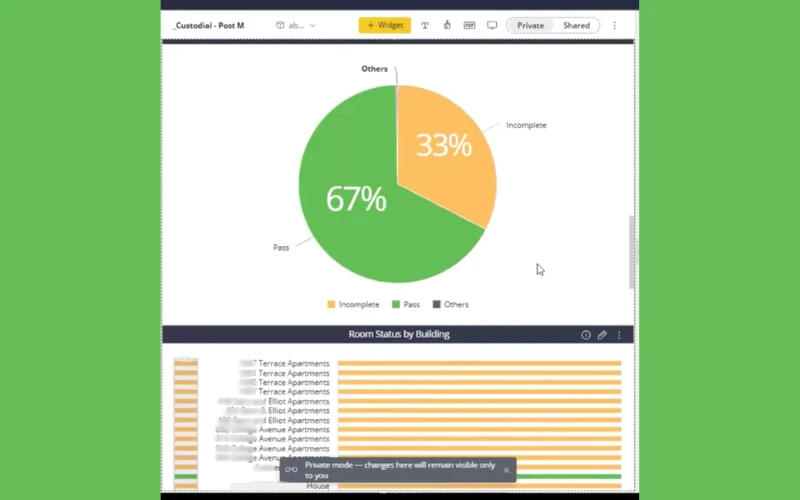
“67% have passed, 33% are incomplete. I would not have known that last year. I had no idea.” Now he can just look at the dashboard and know the status from the snapshot.
The team has also set up a second dashboard intended for pre-move-in inspections — a final check to confirm every space is truly ready for students in the fall.
Different Users, Different Value

Executive
Insights dashboards, capital planning. Instead of numerous spreadsheets, all the information lives in AkitaBox.
Manager
Prioritize and distribute work via visual interface.

Technician
Floor plans on mobile, asset history in the field. Data and information at their fingertips and adding information that influences the capital plan.

Intern
Filling asset data gaps for more complete facility data and to improve maintenance planning.
A More Effective Facilities Team
The visual interface is doing what tables and lists never could: getting staff to actively engage with the system. “Nobody wants to sift through dense tables,” Bieszke says. “The more that they can drill down graphically, the more successful their engagement with the system is.”
It changes the quality of conversations, too. Bieszke describes the old frustration: someone mentions a reach-in cooler needs attention. “Is that the reach-in cooler that’s over there, or is it the reach-in cooler that’s on the opposite side of the room? Is that the one that’s 3 foot high, or is that the one that’s 5 foot high?” Now, the conversation is different: click on it and you can see the picture of it. The information is all in one spot.
The result is a team that has data at their fingertips and can access information much more quickly than ever before. Technicians carry floor plans on their phones instead of coming back to the office for one. New employees have the potential to learn faster because everything lives in one place.
Looking Ahead: Deepening and Expanding Facilities Data
Bieszke’s list of what comes next is less a wish list and more an extension of the same philosophy: if it’s being tracked somewhere else, find a way to bring it into AkitaBox.
Deepening asset data: Asset cleanup is a nonstop job. Summer interns are filling gaps in HVAC assets specifically, and the payoff is direct: the more complete the data, the more it supports capital planning decisions.
Maturing capital planning: The team already uses Insights to guide capital discussions that used to require pulling from numerous spreadsheets. As asset data grows more complete, so does the foundation for those decisions.
Expanding inspection programs: The summer housing inspection pilot proved the concept. Bieszke sees a clear distinction between maintenance tasks and inspections for compliance and condition verification, and he’s looking for more places to deploy the program across the portfolio.
Moving toward system-wide visibility: AkitaBox currently runs on the main campus only. Wheaton’s year-round camp in northern Wisconsin, with its sizable footprint and two-person maintenance staff, is a likely addition.
The thread connecting all of it: “Thinking of AkitaBox as our location for shared information and institutional knowledge is a key aspect of our approach.”